

How to implement lead scoring: the steps from ICP to sales handoff
The 10-step roadmap we use to implement lead scoring in RD Station, with the points where the client signs off on each block before moving on.

To understand how to implement lead scoring, think in four blocks of work: the lead's profile, their interest, the handoff to sales and the follow-up after launch. The first three depend on sign-offs from the client, and the time those sign-offs take goes into the schedule from day one. This is the roadmap we used on a lead scoring project with one of our clients, a technology company, in a rollout that took months.
Below are the 10 steps of that roadmap in RD Station Marketing, what happens in each one and where the company needs to say “go ahead”.
Before you start: what needs to be in place
Lead scoring works when the company already knows its ideal customer and has enough leads to score. With a very small database or no defined customer profile, the score is just a guess with a number on it. If the concept is new to your team, start with lead scoring in RD Station, which explains profile, interest and the A to D grades.
Before the first meeting, check five things:
- the tool: according to the RD Station help center, lead scoring is available on the Pro and Advanced plans;
- the ICP: a description of the ideal customer that sales recognizes;
- the volume: leads coming in every month, so the score can tell them apart;
- the sales team: someone in sales with time to validate criteria and give feedback;
- the destination: where a ready lead goes (CRM, alert, call list).
How to implement lead scoring in 10 steps
The roadmap alternates blocks of execution with client sign-offs, and the next block only starts after approval. The table shows where the sign-offs happen:
| Step | What happens | Client sign-off |
|---|---|---|
| 1. ICP | define the ideal customer and the questions that identify them | yes, with the sales team |
| 2. Calculator | simulate weights and grades in a spreadsheet | yes, with the team |
| 3. Profile score | set up the profile in RD Station | no |
| 4. Smart forms | create the fields and update the active landing pages | no |
| 5. Content mapping | list the materials that count toward the score | yes |
| 6. Interest score | set up the points for each action | no |
| 7. Dynamic segments | create groups by profile and interest | no |
| 8. Handoff to sales | design the automations and the routing | yes |
| 9. Launch | switch everything on and brief sales | no |
| 10. Follow-up | compare scores with sales and adjust | periodic reviews |
Block 1: the profile
The first block answers who the lead is, and it holds two of the four sign-offs. A mistake here spreads to everything else, because the interest of a lead outside your profile is still the interest of a lead outside your profile.
1. ICP defined with sales
The client describes the ideal customer together with the sales team, based on the deals they have already closed. To make it easier, we hand over a document with the right questions: industry, company size, the buyer's role, region served.
Each characteristic becomes a form question, preferably closed, with options to choose from. Open text fields produce answers the tool cannot score.
2. Calculator
Before touching the tool, we simulate everything in a lead scoring spreadsheet: the weight of each field and the grade of each answer. In the Mtools guide, for example, job title gives 10 points to a director, 8 to a manager, 3 to an assistant and 1 to an intern.
The spreadsheet lets the client's team see the effect of the rules on real leads and approve them before setup. Debating a weight in a spreadsheet costs far less than rescoring the whole database later.
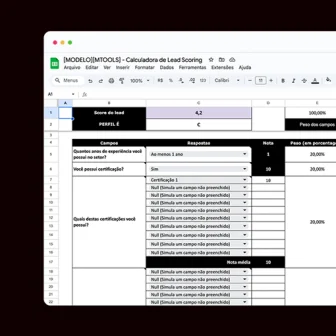 Support material · Spreadsheet in PortugueseLead scoring calculator spreadsheetCreate, test and simulate your lead scoring before setting it up in RD Station Marketing.Download the spreadsheet
3. Profile score in RD Station
With the calculator approved, setup is almost a transcription. RD Station's own guidance is to give more weight to the field that matters most in the sale and a grade of 10 to the answer that converts best into sales, with the others proportional to it.
4. Smart forms
The profile fields become custom fields, and the active landing pages start asking for what is still missing. With smart forms, RD Station shows only the fields the lead has not filled in yet, and the profile fills up with each conversion.
This affects the score, because in RD Station's calculation an empty field is worth zero. It is worth reviewing your landing page forms with that in mind: a few fields at a time, all of them useful for the score.
Block 2: interest
The second block measures how close the lead is to buying, based on what they do. The interest score adds up actions, and each action is worth what it reveals about the stage of the journey.
5. Content mapping
We list every possible conversion (ebooks, webinars, contact requests, newsletters) and classify each one as top, middle or bottom of the funnel. The client signs off on the list, because only they know which materials still reflect the current offer.
It is also the moment to check whether every stage of the journey has a lead magnet that holds up. A funnel with no middle-stage material has no way of showing who is warming up.
6. Interest score
Each action earns points according to how much it brings the lead closer to a purchase. In the Mtools guide, the starting examples are 10 points for an email open, 25 for a click on an email link, 10 for a visit to the pricing page and 100 for a download.
RD Station suggests comparing conversions by a quality metric, such as how many sales each landing page generated, and giving more points to the ones that sell more. Start with low values and adjust based on what real behavior shows.
Block 3: the handoff to sales
The third block decides what happens to each lead, and it changes the sales team's routine. That is why it ends with the most delicate sign-off in the project.
7. Dynamic segments
Profile and interest combine into groups that update themselves. The guide suggests:
- A leads: an automatic alert and a handoff to the sales team;
- B leads: an email flow closer to the sale;
- C leads: educational content;
- D leads: the newsletter and general materials.
8. Handoff sign-off
The client reviews the automations, the criteria that trigger the handoff and what the salesperson receives along with the lead. Also agree on who calls, how fast and how a lead goes back to marketing when it is not ready yet.
The integration between RD Station and your CRM takes that lead, with its history, to the salesperson. Once the sign-off is done, the automations are built.
Block 4: launch and follow-up
The fourth block starts the day the score goes live and has no end date. The first version of the rules is a starting point.
9. Launch
With everything approved, the automations go live. Brief the sales team beforehand, show them how to read the score and watch the first leads that get handed off closely.
10. Follow-up
Compare the leads that became customers with the score they had and adjust weights and points. The Mtools guide gives an example: if leads who click “see pricing” buy faster, that action deserves more points.
This tuning is much easier with sales and marketing alignment in place, with feedback from sales on every lead they receive. At Mtools, lead scoring is part of our email marketing and automation work, from defining the ideal profile to the flows that deliver sales-ready leads.
 Talk to usWant help planning this at your company?Tell us what you need. We'll reply by email or WhatsApp and, if it makes sense, put together a quote.Contact us
How long it takes and why sign-offs belong in the schedule
On a full project, implementation takes months, and part of that time is spent waiting for sign-offs. Each sign-off depends on people at the client who have other priorities, and sales rarely has a free afternoon to review criteria. When the schedule ignores that time, the project looks late by the second week.
Three habits keep things moving:
- Dates for each sign-off, set at the start of the project, with the people who need to be in the meeting.
- One owner on the client side, who gathers the answers from sales and leadership.
- Decisions in writing, so nobody reopens an approved criterion halfway through setup.
When you work out how to implement lead scoring, setup time in the tool is the smallest part. What weighs most is the agreement between marketing and sales on what a good lead looks like.
Frequently asked questions
Do I need RD Station Pro to implement lead scoring?
Yes. According to the RD Station help center, the feature is available on the Pro and Advanced plans. On other plans, you can simulate the rules in a spreadsheet and prepare the ground.
What is the difference between profile and interest?
Profile measures how closely the lead matches the ideal customer, based on form answers. Interest measures how close they are to buying, based on what they do: opening emails, visiting pages, downloading materials, asking to be contacted.
Where should I start if I want to learn how to implement lead scoring on my own?
With the ICP and the calculator. Once the ideal profile is written down and the rules are simulated in a spreadsheet, setup in RD Station is quick, and the conversation with sales starts from a concrete proposal.
Who should approve the scoring criteria?
Marketing and sales together. Marketing knows which actions signal interest; sales knows which leads became customers. When one side approves alone, the score loses the other side's trust.