

Lead scoring spreadsheet: simulate your scores before setting up RD Station
Test scores and weights in a spreadsheet, validate them with past leads from your CRM and bring a tested model to the meeting with sales. With the calculator to download.

A lead scoring spreadsheet lets you test how you score leads before touching RD Station. You set the points and weights for your ideal customer profile, run real leads through the model and walk into the meeting with sales carrying a model that has already been tested.
Setting it up straight in the tool looks faster, but every later change affects segments, automations and the sales queue. Below is how our calculator works and how to use it to get the model approved by sales and leadership.
Why simulate lead scores before configuring
Simulating first replaces opinions with a test based on data. In RD Station Marketing, lead scoring is available from the Pro plan up and combines contact profile and behavior. Once the model goes live, it already decides who goes to sales.
In the spreadsheet, you see the effect of each weight before that. If sales thinks job title matters more than industry, the change takes seconds and the result shows up right away. Without that shared model, the lack of priority becomes one of the sources of lead leakage between the form and the sale.
How the lead scoring spreadsheet works
The spreadsheet has two working tabs: one calculates a lead's score, the other holds the profile setup and the interest reference.
The “Peso” (weight) tab
Each row is a form field. For each field, you enter the lead's answer, the score for that answer and the field's weight as a percentage. The weights add up to 100%, and the spreadsheet multiplies score by weight, adds everything up and shows the lead's score and profile letter, from A to D.
In the example that comes filled in, three answers add up to 4.2 points and the lead lands in profile C. You can also simulate blank fields, which helps when your forms collect data gradually.
The “Perfil leads” (lead profile) tab
This is where your profile-based lead scoring model lives: the fields, the weight of each one and the points for each answer. Next to it is a reference of interest points for top, middle and bottom of funnel conversions, hand-raisers and nurture flows, which you set up later in RD Station.
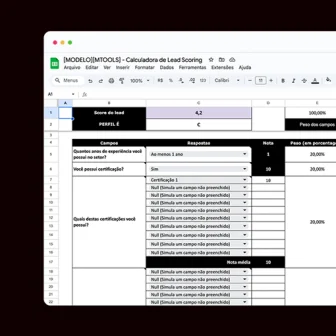 Support material · Spreadsheet in PortugueseLead scoring calculator spreadsheetCreate, test and simulate your lead scoring before setting it up in RD Station Marketing.Download the spreadsheet
How to use the lead scoring calculator in 4 steps
These steps take you from a blank copy to a model validated with your own leads.
- Make a copy and adapt it. Duplicate the file and replace the sample fields with the ones your form asks, such as job title, company size and industry.
- Set scores and weights. Answers closer to your ideal customer get higher scores; the fields that best separate a good customer from a casual visitor get more weight.
- Validate with past leads from the CRM. Pick customers who closed and leads sales rejected, fill in each one's real answers and see where they land. Customers in C or D, or rejected leads in A, mean the weights need adjusting.
- Build the interest model. Use the reference table to give bottom-of-funnel actions more points than top-of-funnel ones.
What to bring to the meeting with sales
Bring the tested model and a proposed rule, so the conversation ends in a decision:
- the fields, scores and weights, with the reason behind each choice;
- the validation result, with your own numbers: how many closed customers ended up in A or B;
- the handoff rule, with what happens to each letter (A goes to sales, B gets emails closer to a sale, C gets educational content, D stays on the newsletter);
- the date of the first review.
This meeting is the practical side of sales and marketing alignment, because sales helps define the model it will use.
From the spreadsheet to RD Station
With the model approved, configuring the tool becomes a copy of what was already decided. The step-by-step for lead scoring in RD Station shows where each part goes, and the article on how to implement lead scoring covers launch and the first reviews. If you'd rather hand it off, setup is part of our email marketing and automation work.
 Support material · Guide in PortugueseLead scoring guide for RD StationIdentify and prioritize the leads with the most potential and stop spending time on contacts that won't convert.Download the guide
Frequently asked questions
Does a lead scoring spreadsheet replace the tool?
No. It simulates and documents the model. Automatic scoring, which changes with every action a lead takes, runs in RD Station or in your automation tool.
Do I need RD Station to use the spreadsheet?
The spreadsheet works on its own, in Google Sheets, and it is in Portuguese. The profile and interest logic applies to other tools, but the names and tabs follow RD Station.
How many profile fields should I use?
There is no limit, but long forms put people off. Prefer closed fields with options to choose from and complete the profile gradually, with each new conversion.